


How High-Megapixel Cameras Impact Video Storage
As a security integrator or distributor, you need to understand how megapixels (MP) affect storage use to design appropriate solutions for your clients. High-resolution video files can create memory and replay challenges, making a well-planned solution essential. This guide covers everything you need to know about how megapixels impact video storage, including how to calculate ideal capacity and system architecture factors to consider.
How Many Megapixels Do You Need for a Security Camera?
Many people wonder if megapixels matter for security cameras and often believe bigger is better. However, additional megapixels don’t always mean a higher quality video.
While a high-MP camera will have better images than a low-MP device if the lens, image sensors and processing algorithms are identical, a camera with fewer megapixels can produce the same quality video with better sensors and lenses. For example, a high-quality optical zoom lens allows you to zoom in and out without degrading image quality or taking the image out of focus, even at a lower resolution.
High-definition cameras are at least 1 MP. They may also be classified by their horizontal and vertical pixel count. For example, a 3 MP device with a resolution of 2,304-by-1,296 pixels might be known as a 2K camera since it’s approximately 2,000 pixels wide or a 1296p camera for its pixel height.
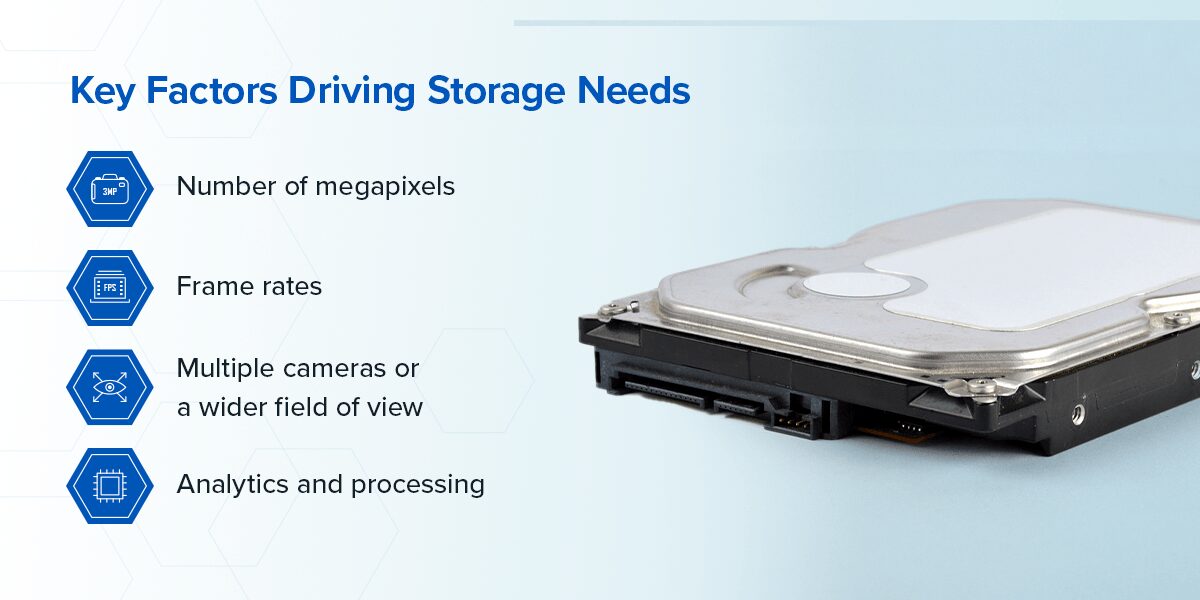
Key Factors Driving Storage Needs
Several factors affect video recording storage, including megapixels, frame rates, number of cameras and analytics. In short, more means more. More megapixels, cameras or frames per second (fps) mean more data, which requires more memory.
- Number of megapixels: A high-MP camera typically requires higher bandwidth and storage space. Some devices allow you to adjust the megapixels as needed. Note that high-MP cameras may require special network video recorders (NVRs).
- Frame rates: More frames means more storage. You can lower the overall frame rate or choose scaled recording. While real-time recording keeps every individual frame, scaled recording selectively drops frames, such as deleting identical frames over a short period. This process saves space but can result in a choppier video.
- Multiple cameras or a wider field of view: You may need multiple devices or special panoramic equipment to cover a broad expanse. Sometimes, you can get similar coverage with fewer, higher-resolution cameras.
- Analytics and processing: Analytic software can reduce memory requirements, such as by only recording when motion is detected or integrating scaled recording. However, processing often increases file sizes by adding metadata and indexing information. Storing multiple streams in different resolutions or archiving the original video and an analyzed copy will increase storage needs. Very sophisticated software, such as AI options, may also require additional storage space or processing power.
Calculating Optimal Storage Capacity
The ideal storage capacity for a specific use case depends on several variables, including the number of cameras and the retention period. Again, more is more. Here are the main factors to consider:
- Video compression: A codec algorithm compresses and decompresses video files. H.265 is the newest option, providing a similar video quality in a smaller file size than H.264. Better compression means you can store more video in the same space. The camera compresses raw video automatically.
- Bit rates: A higher resolution camera requires a higher bit rate and additional memory. The optimal bit rate balances file size and video quality. The bit rate is generally measured in megabits per second (Mbps). Efficient compression can deliver the same quality at a lower bit rate. The bit rate for a camera is typically given after compression.
- Recording time: Constant recording requires more storage than recording only when motion is detected or an event occurs. Selective recording is more efficient and saves space.
- Number of cameras: Of course, more cameras need more storage.
- Retention period: Storing files longer means you’ll need extra storage space. Many companies retain data for 30-60 days, though regulations may require longer periods. For example, financial institutions must store video for at least 180 days.
Once you know these numbers, here’s how to calculate the required storage capacity:
- Convert to megabytes per second (MBps): Convert Mbps to MBps by dividing by 8. For a 2 Mbps camera, that’s 2 divided by 8, or 0.25 MBps.
- Multiply by recording time: If you record 24/7, multiply by 3,600 seconds, then 24 hours for daily storage per camera. For our 2 Mbps camera, that’s 0.25 MBps x 3,600 seconds/hour x 24 hours/day, which is 21,600 MB/day or about 21 gigabytes (GB).
- Multiply by the number of cameras: If you have four devices, that’s 21 GB/day x 4 = 84 GB/day.
- Multiply by the retention period: For a 30-day retention period, that’s 84 GB/day x 30 days = 2,520 GB or about 2.5 terabytes (TB).
- Add a buffer: It’s best to add a buffer of at least 20% to account for changes requiring additional storage. In our example, 2.5 TB x 1.2 = 3 TB.
Use our custom bandwidth and storage calculator to ensure accurate calculations. Incorrect calculations can lead to a system you thought would last for years quickly becoming obsolete.
Designing Storage Architecture
When designing a video storage system, consider the server location, network topologies, disk arrangement and data tiers:
- Server location: The main server options are on-premises, cloud storage or a hybrid model. Hybrid architectures are often ideal since they store recent footage on-site and archive older footage in the cloud.
- Network topologies: In the past, most people had direct-attached storage (DAS) plugged into the computer. It was inexpensive but disconnected from other systems. These days, companies typically choose between network attached storage (NAS) or a storage area network (SAN), which both create shared spaces. SAN is generally better for high-performance applications, but choosing between NAS and SAN depends on several factors.
- Disk arrangement: There are different ways to combine multiple hard drives into one unit, and each arrangement affects performance and risk. The redundant array of independent disk (RAID) rating indicates the arrangements. RAID 0 uses striping to increase speed but provides no redundancy. RAID 1 uses mirroring to duplicate data but provides no performance improvement. RAID 10 combines them for high performance and redundancy. RAID 5 uses striping with parity to balance performance and redundancy, using parity data to reconstruct data if a single drive fails.
- Data tiers: Tiering data into hot and cold storage can optimize memory use for your most-used files. Hot data is frequently accessed and is better stored on fast hard drives like SSDs for quick access. These drives are usually more expensive. Cold data is infrequently accessed and can be moved to slower, less expensive storage like traditional hard drives or the cloud. Hot/cold tiering can automatically move data between memory types depending on how often it’s accessed.
Combining these methods in different ways lets you build the most efficient storage system for each situation.
Balancing Performance and Availability Requirements
In addition to static capacity, your system must also have the necessary performance and availability. To access and review videos quickly, you need a high bandwidth for faster data transfer. However, you want to balance storage capacity with actual throughput by choosing appropriate disk types.
Traditional hard drives have a higher capacity but slower read/write speeds due to their mechanical nature. Solid state drives (SSDs) are significantly faster since they are electronic rather than mechanical, but they typically have lower maximum memory. Additionally, hard drives are often less expensive per gigabyte, offering more space compared to SSDs of the same price.
Storage visualization tools can help users monitor capacity use and performance metrics, allowing proactive management to better optimize memory use.
Managing the Storage Life Cycle
The first step to managing the storage life cycle is predicting future needs so you can plan for additional or upgraded hardware. You’ll want to develop a data migration and system refresh plan to ensure data integrity and minimal downtime during upgrades. To prevent unauthorized access to videos, follow secure data decommissioning processes, such as degaussing, cryptographic erasure or physical destruction.
Partner With BCD For Reliable Storage Requirement Calculations
When you need reliable video storage for high-MP security cameras, you can trust BCD. We guarantee our systems will work as promised. Our hardware is software-agnostic, and all solutions are purpose-built, so we can design a custom product that meets your needs, whatever your architecture type. Servers are preinstalled with Harmonize Bridge, ensuring cloud compatibility. We can also provide cloud-only solutions if you don’t need hardware.
To learn more about how we can help you create the ideal system for your clients, reach out to us today or request a quote online.

Popular Posts


Confidence Built In
Choose Trusted Security Solutions From BCD
At BCD, we value all projects, no matter how big or small. We focus on providing purpose-driven solutions that make a difference to every security system. You can count on our extensive customer service to provide technical support whenever you need it — before, during and after the sale. Our support team will work with you to ensure seamless operation. Contact us online to discuss your next deployment.